
Blocks CSS — WordPress Custom CSS Plugin
Blocks CSS: CSS Editor for Gutenberg Blocks
by Hardeep Asrani · WordPress.org page · Website
Blocks CSS has 5,000+ active installs on WordPress.org and 232,203 downloads all time. It was downloaded 8,031 times in the last 30 days. The last update was on October 19, 2026, tested up to WordPress 7.0.7.
Blocks CSS at a glance
Is Blocks CSS well maintained?
Blocks CSS reviews and ratings
25 reviews on WordPress.org, with the most recent ones as their authors posted them.
25 reviews
- 5★
-
23
- 4★
-
1
- 3★
-
1
- 2★
-
0
- 1★
-
0
-
Indispensable!
Works like a charm on any of my recent WP projects. [EDIT]I need to change my review.On some setups, I get two CSS editors shown in the "Custom CSS" attribute panel, and only contents of the second instance are getting saved.Problem:Two CodeMirror editors are displayed in the Custom CSS panel of the Blocks CSS plugin instead of one. Both editors are located in the same container. Assumed Root Cause:WordPress enables React StrictMode by default in the Block Editor. React StrictMode runs useEffect hooks twice to detect potential side effects. Analysis:The Blocks CSS plugin initializes CodeMirror in a useEffect hook.Since this useEffect doesn't have a cleanup function that checks whether CodeMirror is already initialized, wp.CodeMirror() is called again on every mount cycle. With StrictMode enabled, this means: twice on the same DOM element. Probable Solution:The useEffect hook should implement a cleanup function that prevents CodeMirror from being initialized multiple times on the same element.Side Notes:This only happens in some of my setups. I couldn't figure out any possibly conflicting theme, plugin or code snippet. So I assume it might be something like a timing issue. Conclusion:I won't change the 5-star rating, because despite of this problem the plugin does its job. And I know how to handle this issue by a simple CSS rule to hide all Block CSS CodeMirrors except the last one:#o-css-editor .CodeMirror:not(:last-child) { display: none;}
maltmann -
Отличный плагин
Отличный плагин
Сергей -
Моя оценка: пять звезд
Очень классные возможности! Пользуюсь постоянно!
shooter604 -
The Other Review Titles Say It All
"Essential, Useful Tool, Completes the Block Editor, Should be part of the core," The one thing they don't mention is how quick and genuinely concerned the support is.
someguy42 -
Simple and great plugin!
Does exactly what I need it to do.
Andreslav -
Completes Block Editor
Can't think of Block Editor without this. Tiny powerful thing. Only thing I hate in this plugin is the following line: $render_css = empty( $file_name ) || strpos( $file_name, 'post-v2' ) === false; This means if you deactivate Otter, your content might just break :(
Masud Rana
Download and install history
13,121 downloads over the last 48 days. Snapshots taken daily from WordPress.org.
Where Blocks CSS ranks on WordPress.org
The rankings we track that Blocks CSS appears in, and how its position changed over 30 days.
| Ranking | WordPress.org placement | Position | 30 days |
|---|---|---|---|
| Best Custom CSS Plugins | #16 by tag, #8 in search | #5 | ▲1 |
Blocks CSS alternatives
Plugins that solve the same problem, ranked by how closely they overlap with Blocks CSS.
-
 Insert PHP 50,000+ installs · 4.5
 -
 Custom CSS Pro 7,000+ installs · 5.0
 -
 Post/Page Specific Custom Code 6,000+ installs · 4.6
 -
 FluentSnippets 50,000+ installs · 4.7
 -
 Simple Custom CSS 100,000+ installs · 4.7
Compare Blocks CSS head to head
 Blocks CSS vs Custom CSS for Elementor
 Blocks CSS vs Simple Custom CSS and JS
-
Blocks CSS vs Custom CSS Pro
-
Blocks CSS vs FluentSnippets
-
Blocks CSS vs Insert PHP
 Blocks CSS vs Modular Custom CSS
-
Blocks CSS vs Post/Page Specific Custom Code
 Blocks CSS vs Simple CSS
-
Blocks CSS vs Simple Custom CSS
 Blocks CSS vs WP Add Custom CSS
Details
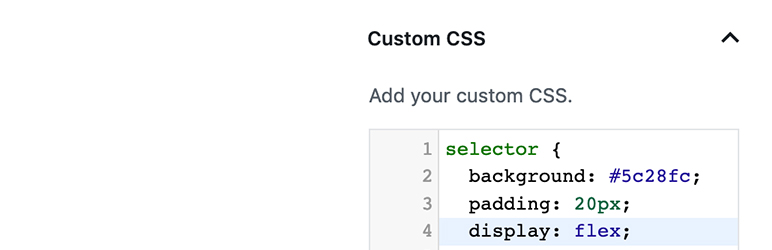
Blocks CSS allows you add custom CSS to your Blocks straight from the Block Editor (Gutenberg).
The full description, screenshots and every review live on the WordPress.org page.
Tags
- block-editor
- css editor
- custom css
- design
- gutenberg
More from Hardeep Asrani
-
 Blocks Animation 90,000+ installs
 -
 Advanced CSS Editor 4,000+ installs
 -
 Blocks Export Import 1,000+ installs
 -
 BuddyPress Captcha 100+ installs
- Version
- 3.2.8
- Last updated
- Oct 19, 2026
- First published
- Feb 14, 2019
- Requires WordPress
- 6.6
- Tested up to
- 7.0.7
- Requires PHP
- 5.4
- Pricing
- Free on WordPress.org
Blocks CSS FAQ
How many active installs does Blocks CSS have?
WordPress.org reports 5,000+ active installs for Blocks CSS as of October 22, 2026.
Is Blocks CSS still maintained?
Yes. The last release was on October 19, 2026 and it is tested up to WordPress 7.0.7.
Does Blocks CSS have good support?
On the WordPress.org forum, 1 of 1 recent support threads for Blocks CSS are marked resolved. That is the developer's free support; a paid version usually comes with its own channel.
Is Blocks CSS free?
Blocks CSS is free to install from WordPress.org. Many plugins also sell a paid version or add-ons.
Where does Blocks CSS rank among Custom CSS Plugins?
Blocks CSS is #5 in the WordPress.org "custom-css" ranking as of today.