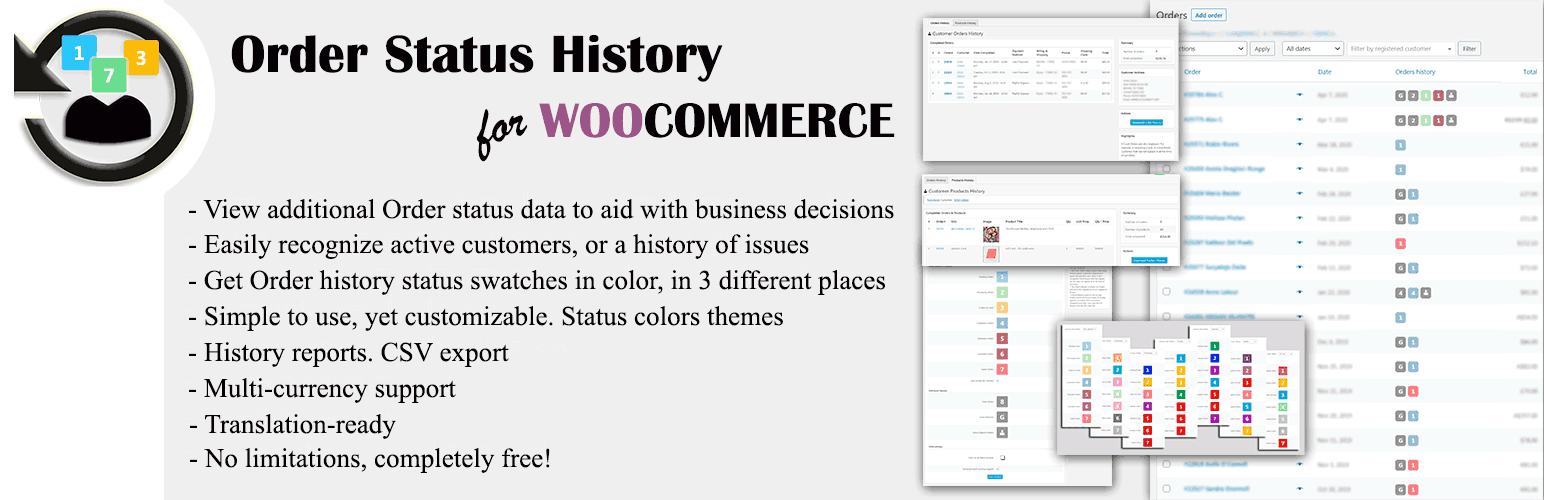

Order Status History for WooCommerce
by alx359 · WordPress.org page · Website
Order Status History for WooCommerce has 1,000+ active installs on WordPress.org and 13,592 downloads all time. We have tracked it since September 4, 2026; download trends appear after 30 days of data. The last update was on January 7, 2026, tested up to WordPress 6.9.7.
Order Status History for WooCommerce at a glance
Is Order Status History for WooCommerce well maintained?
Features
The feature list from the plugin's own readme on WordPress.org, trimmed to the essentials.
- A graphical add-on for WooCommerce. Simply install and you’re ready to go
- For each Order in the Orders table, get additional data displayed, like: has a customer ordered before, repeatedness, and unusual behavior (e.g. due payments…
- The newly added Order history column is also sortable. The Shop Manager now can easily discern their most repeating customers, or those with the most issues…
- Shows Order history statuses as color swatches in 3 different places: the Orders page, the Edit Order page, and the Users page
- Status colors are fully customizable, including the default WooCommerce statuses. Many color themes also available, inspired from major shopping carts
- Can work in conjunction with, or replace altogether, the default WooCommerce status swatches
- Fully supports Guest, registered Customer, and mixed Guest / Customer Orders
- Detailed reports of past Orders, purchased Products, and all notes sent to Customer or private, for any registered or Guest Customer
- CSV export of Orders, Products, and Notes reports
- Support of composite products within Reports
- Multi-currency support, with some extra usability features
- Translation-ready
Order Status History for WooCommerce reviews and ratings
14 reviews on WordPress.org, with the most recent ones as their authors posted them.
14 reviews
- 5★
-
14
- 4★
-
0
- 3★
-
0
- 2★
-
0
- 1★
-
0
-
Simple and effective
Plugin functions perfectly as described. Appreciation for the developers. Keep it up! Although it would be nice to have some summary graphs / tables on dashboard or elsewhere... Recently I've been trying to find things like the total number of customers with more or less than X number of orders. customers with only failed orders, guest customers with repeat orders etc.. Maybe a list view with advance filters could work to start off with. Just a suggestion.
Nadir -
Perfect
Just perfect, easy and without problems, just perfect
Panagiotis -
FEATURE REQUEST (Plugin Rocks!)
First off I dont really leave reviews for plugins. I appreciate this one so much though as a CRO specialist and marketer that I had to say thank you for making it. I love all the amazing features and its so useful in a variety of ways. I'd like to ask that you enable the ability to see the orders and products from those orders on the same page though as its helpful to see if someones first order was 1 of something and then sequential orders stayed at that or grew. There could be a summary at the top of the client history to show summary on one page as well including: 3 of orders, date of first order, average days between orders, average order value (if thats data your plugin has access to. I would gladly pay to see this info onsight versus what I currently do which is go to an external website to see this information which I pay $50 a month to use and would gladly pay you! One small UI thing...on customer order history you have tabs for order, products...its easy to miss and should be lower on the page so users see. I didnt see it was there for a while.
The Hemp Collect -
Amazing, I have been using it for 2 years now!
That's a great plugin, easy to use and no issues whatsoever!
piergiorgiosan -
Amazing!!
Perfect, does exactly what I'm looking for and even more! Works like a charm!
Rasetsukoku -
Great Plugin!
Great plugin with smooth integration and fast support!
teodorc
Order Status History for WooCommerce alternatives
Plugins that solve the same problem, ranked by how closely they overlap with Order Status History for WooCommerce.
-
 WC Order Test 6,000+ installs · 5.0
 -
 Order Tracking 3,000+ installs · 4.6
 -
 Custom Order Status Manager for WooCommerce 30,000+ installs · 4.7
Details
Speed up your daily processing of orders by getting to know more about who's ordering. Themed order status color swatches, Reports, CSV, free.
The full description, screenshots and every review live on the WordPress.org page.
Tags
- order status
- past orders
- woocommerce history
- woocommerce order history
- woocommerce orders
More from alx359
-
 Gateway for Wise on WooCommerce 1,000+ installs
- Version
- 2.0.2
- Last updated
- Jan 7, 2026
- First published
- Apr 14, 2020
- Requires WordPress
- 5.0
- Tested up to
- 6.9.7
- Requires PHP
- 7.0
- Pricing
- Free on WordPress.org
Order Status History for WooCommerce FAQ
What does Order Status History for WooCommerce do?
According to its WordPress.org readme, Order Status History for WooCommerce offers A graphical add-on for WooCommerce. Simply install and you’re ready to go, For each Order in the Orders table, get additional data displayed, like: has a customer ordered before, repeatedness, and unusual behavior (e.g. due payments, The newly added Order history column is also sortable. The Shop Manager now can easily discern their most repeating customers, or those with the most issues, Shows Order history statuses as color swatches in 3 different places: the Orders page, the Edit Order page, and the Users page and Status colors are fully customizable, including the default WooCommerce statuses. Many color themes also available, inspired from major shopping carts.
How many active installs does Order Status History for WooCommerce have?
WordPress.org reports 1,000+ active installs for Order Status History for WooCommerce as of September 7, 2026.
Is Order Status History for WooCommerce still maintained?
Yes. The last release was on January 7, 2026 and it is tested up to WordPress 6.9.7.
Is Order Status History for WooCommerce free?
Order Status History for WooCommerce is free to install from WordPress.org. Many plugins also sell a paid version or add-ons.