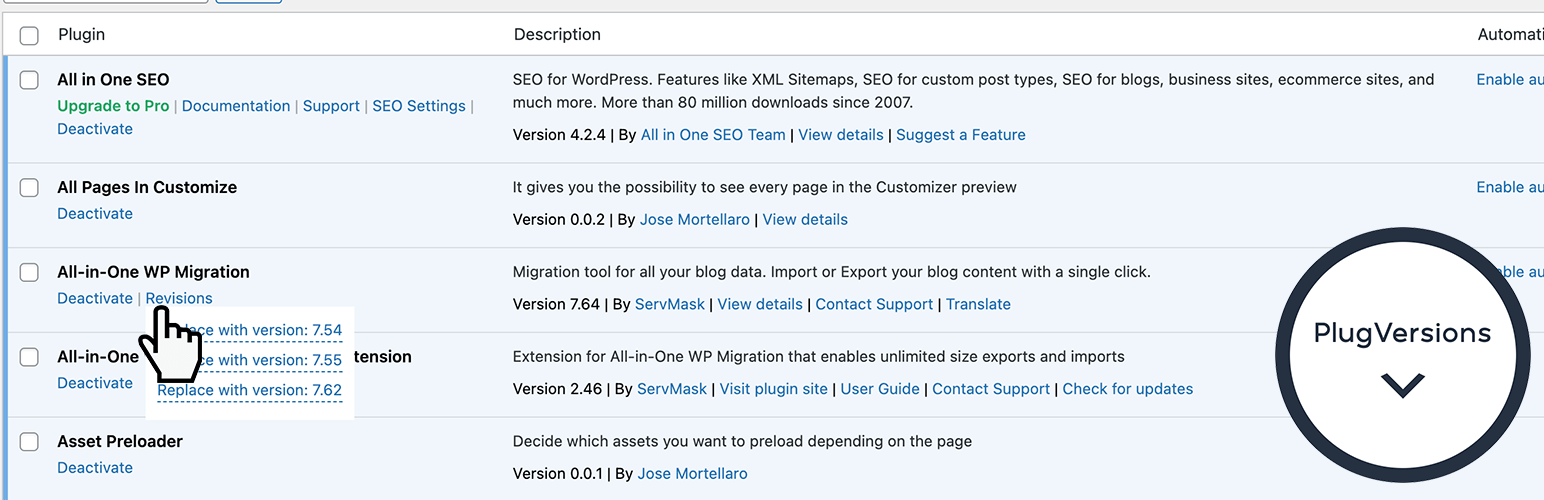

PlugVersions — WordPress Backup Plugin
PlugVersions – Easily roll back to previous versions of your plugins.
by Jose Mortellaro · WordPress.org page · Website
PlugVersions has 1,000+ active installs on WordPress.org and 22,027 downloads all time. We have tracked it since September 4, 2026; download trends appear after 30 days of data. The last update was on May 21, 2026, tested up to WordPress 6.8.8.
PlugVersions at a glance
Is PlugVersions well maintained?
Features
The feature list from the plugin's own readme on WordPress.org, trimmed to the essentials.
- Install and activate PlugVersions
- Go to the Plugins page in your WordPress dashboard
- For any plugin that has been updated, you’ll see a “Revisions” action link. Hover over it to view the list of previously stored versions
- Click on the version you want to restore
- That’s it. Your plugin is rolled back!
PlugVersions reviews and ratings
8 reviews on WordPress.org, with the most recent ones as their authors posted them.
8 reviews
- 5★
-
6
- 4★
-
1
- 3★
-
0
- 2★
-
0
- 1★
-
1
-
Needs better security features
Nathan Ingram's old post ("What does this do?") raises an important security concern. Old, insecure plugin versions remain in web-accessible folders with only a "security by obscurity" hope that the random folder names can't be guessed. This may be an unlikely attack vector, but it's just not good to keep obsolete and insecure code around a long time. A "delete old versions" feature — globally and per plugin — would be helpful. Even better: allow Plugversions to be limited in scope to individual, admin-selected plugins rather than every plugin. Edited: Thanks to Jose for explaining the stored plugin versions are not usable as exploitable code or payloads that could be activated by an attacker who did not already have the ability to install and activate anything they want. It's still a danger to keep old, insecure code around, however — the likely mishap would come from user error where an old, insecure version is rolled back into use. Coupled with a good security monitoring plugin/service, Plugversions is a really helpful maintenance tool — and it would be more helpful if the old versions could be easily purged, identified if insecure, and not automatically stored for every plugin with every update. A simple per-plugin opt-in like "Enable Versioning" would prevent wasted storage space and retention of unwanted old code.
Dan Knauss -
Not able to view any Revisions on plugin page.
This is useless plugin Simply creating and uploading a plugin on WordPress is not sufficient if it’s neither functioning correctly nor providing any option to display its intended features. Ensure that the plugin is properly coded, adheres to WordPress standards, and includes necessary hooks or settings for displaying its functionality. Debugging and testing are crucial before deploying it.
kevinmanvar27 -
Graceful as it Is
Works excellently with Wordpress 6.4.3 and also with ClassicPress 2.0 (based on WP 6.3). Many thanks to good developer!
Juhan -
Disgraceful as it Is
Finally managed to delete this plugin by going to my host's cpanel and deleting it from my file manager (as trying to delete it from my WordPress install gave a critical error message). The reason? I consider any rollback plugin as one that you can use, then delete it when you've done the rollback. This plugin though does not allow that and needs to be installed and live to go back to an older version. However, trying to delete it is where the fun starts: On deactivating PlugVersions, ALL of the versions of plugins, and themes that have been rolled back now appear as NEW plugins that need to be removed and deleted. These plugins also appear in WordFence - but when you see which plugins need updating, nothing is there - they just appear in your admin bar as plugins that need updating. I needed to delete 21 versions of plugins and themes and as already mentioned, delete Plugversions from my hosting cpanel. Probably the worst plugin that I've ever installed.
deeveearr -
This is a Must-Have!
PlugVersions is a WordPress game-changer, offering effortless plugin rollback for unmatched site stability and peace of mind. Essential, intuitive, and reliable, it's more than a tool - it's your website's ultimate safety net.
paolurso -
FANTASTICO plugin
Plugin che fa esattamente quello che promette !!! Dovrebbe essere compreso di base nell'installazione di tutti i siti con wordpress !!!
gunshotsoftair
Where PlugVersions ranks on WordPress.org
The rankings we track that PlugVersions appears in, and how its position changed over 30 days.
| Ranking | WordPress.org placement | Position | 30 days |
|---|---|---|---|
| Best Backup Plugins | #62 by tag, not in search | #93 | – |
PlugVersions alternatives
Plugins that solve the same problem, ranked by how closely they overlap with PlugVersions.
-
 WP Umbrella 80,000+ installs · 4.8
 -
 Free 1-Click WordPress Migration 300+ installs · 4.5
 -
 WP-DBManager 60,000+ installs · 4.4
 -
 BackWPup 400,000+ installs · 4.0
 -
 JetBackup 200,000+ installs · 4.5
Details
Retains up to three versions when you update a plugin. It works with premium and custom plugins too.
The full description, screenshots and every review live on the WordPress.org page.
Rankings PlugVersions competes in
Tags
- backup
- plugin versions
- restore
- rollback
- update
More from Jose Mortellaro
-
 Freesoul Deactivate Plugins 8,000+ installs
 -
 Hide Tooltips on Hover 4,000+ installs
 -
 Specific Content For Mobile 4,000+ installs
 -
 Lazy Load Control For Elementor 3,000+ installs
- Version
- 0.2.1
- Last updated
- May 21, 2026
- First published
- Sep 12, 2022
- Requires WordPress
- 4.9
- Tested up to
- 6.8.8
- Requires PHP
- 7.4
- Pricing
- Free on WordPress.org
PlugVersions FAQ
What does PlugVersions do?
According to its WordPress.org readme, PlugVersions offers Install and activate PlugVersions, Go to the Plugins page in your WordPress dashboard, For any plugin that has been updated, you’ll see a “Revisions” action link. Hover over it to view the list of previously stored versions, Click on the version you want to restore and That’s it. Your plugin is rolled back!.
How many active installs does PlugVersions have?
WordPress.org reports 1,000+ active installs for PlugVersions as of September 7, 2026.
Is PlugVersions still maintained?
Yes. The last release was on May 21, 2026 and it is tested up to WordPress 6.8.8.
Does PlugVersions have good support?
On the WordPress.org forum, 0 of 1 recent support threads for PlugVersions are marked resolved. That is the developer's free support; a paid version usually comes with its own channel.
Is PlugVersions free?
PlugVersions is free to install from WordPress.org. Many plugins also sell a paid version or add-ons.
Where does PlugVersions rank among Backup Plugins?
PlugVersions is #93 in the WordPress.org Backup Plugins ranking.