
Variable Inspector
by Bowo · WordPress.org page · Website
Variable Inspector has 100+ active installs on WordPress.org and 75,449 downloads all time. It was downloaded 413 times in the last 30 days. The last update was on May 22, 2026, tested up to WordPress 7.0.7.
Variable Inspector at a glance
Is Variable Inspector well maintained?
Features
The feature list from the plugin's own readme on WordPress.org, trimmed to the essentials.
- vi( $variable ) inspector to replace the do_action() above and automatically includes the file path and line number. Or, use vis( $variable_name…
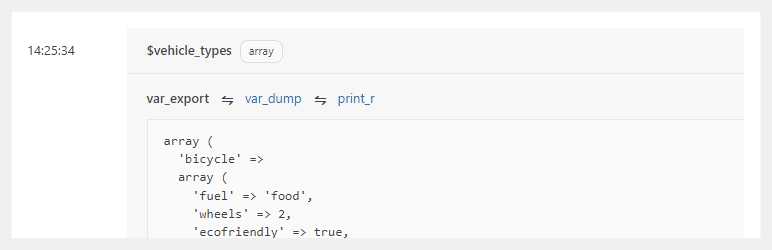
- dump_print_r and dump_print_tree viewers: both viewers combines var_dump and print_r, with the later allowing for collapsing and expanding data nodes, which is…
- kint viewer: an advanced viewer with table view for multi-dimensional arrays, node access path info, capability to search inside variables, pop-up window…
- Categorize and filter results by color. This, for example, allows you to categorize $variables according to which stage they’re in inside your code
- Add counter or notes to inspection results. Another way to tag $variables and provide context for the inspection results
- Search filter: easily find certain $variables by name and type
- View up to 250 results. The free version is limited to 25 results
- Individual and bulk deletion of results. Easily clean up your inspection dashboard from obsolete results you no longer need to reference. You can also select…
Variable Inspector reviews and ratings
5 reviews on WordPress.org, with the most recent ones as their authors posted them.
5 reviews
- 5★
-
5
- 4★
-
0
- 3★
-
0
- 2★
-
0
- 1★
-
0
-
Interesting To Play With and Debug
I really like what I see. It's a nice little plugin with the sole purpose of helping you to debug and read variables in an easy and quality way. I've just tested it on my dev site, but can't wait to use it on a real project. I can see how it would have helped me in the past. P.S. I've bought PRO version and plan on keeping it!
mediteranija -
All I need
Enough to test the function of snippets. Works flawless.
tesig -
King of PHP Debugging
It is a great plugin for developer use! You can debug easily every variable without printing needed anymore. You also can add feature to "display all" and "hide all" by default, saving maybe to a cookie. And also let users save their favorite view "var_export" or "var_dump" or "print_r"
Pexle Chris -
Exactly what I needed
It does what it does very well, and doesn't try to do everything.
swb1 -
Works great!
Works great on a single install, but not so much on a multisite. Any interest in making it work on a multisite? Either way, thanks for your work, love this thing.
Josh
Download and install history
576 downloads over the last 48 days. Snapshots taken daily from WordPress.org.
Details
Inspect PHP variables on a central dashboard in wp-admin for convenient debugging.
The full description, screenshots and every review live on the WordPress.org page.
Tags
- debug
- developer
- php variables
- variable dump
More from Bowo
-
 Admin and Site Enhancements 200,000+ installs
 -
 Debug Log Manager 10,000+ installs
 -
 System Dashboard 900+ installs
 -
 Flexible Scroll Top 100+ installs
- Version
- 2.7.1
- Last updated
- May 22, 2026
- First published
- Apr 13, 2022
- Requires WordPress
- 4.8
- Tested up to
- 7.0.7
- Requires PHP
- 5.6
- Pricing
- Free on WordPress.org
Variable Inspector FAQ
What does Variable Inspector do?
According to its WordPress.org readme, Variable Inspector offers vi( $variable ) inspector to replace the do_action() above and automatically includes the file path and line number. Or, use vis( $variable_name, dump_print_r and dump_print_tree viewers: both viewers combines var_dump and print_r, with the later allowing for collapsing and expanding data nodes, which is, kint viewer: an advanced viewer with table view for multi-dimensional arrays, node access path info, capability to search inside variables, pop-up window, Categorize and filter results by color. This, for example, allows you to categorize $variables according to which stage they’re in inside your code and Add counter or notes to inspection results. Another way to tag $variables and provide context for the inspection results.
How many active installs does Variable Inspector have?
WordPress.org reports 100+ active installs for Variable Inspector as of October 22, 2026.
Is Variable Inspector still maintained?
Yes. The last release was on May 22, 2026 and it is tested up to WordPress 7.0.7.
Does Variable Inspector have good support?
On the WordPress.org forum, 0 of 1 recent support threads for Variable Inspector are marked resolved. That is the developer's free support; a paid version usually comes with its own channel.
Is Variable Inspector free?
Variable Inspector is free to install from WordPress.org. Many plugins also sell a paid version or add-ons.