Widget Visibility Control
by Fernando Tellado · WordPress.org page · Website
Widget Visibility Control has 200+ active installs on WordPress.org and 2,601 downloads all time. It was downloaded 645 times in the last 30 days. The last update was on October 2, 2026, tested up to WordPress 7.1.3.
Widget Visibility Control at a glance
Is Widget Visibility Control well maintained?
Features
The feature list from the plugin's own readme on WordPress.org, trimmed to the essentials.
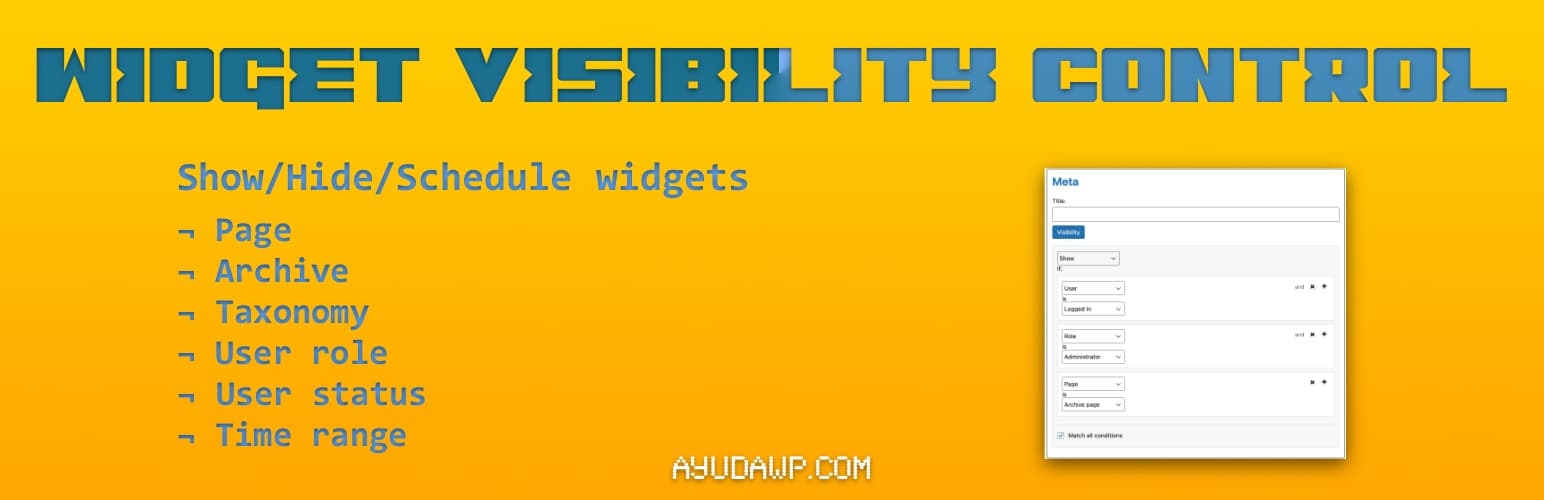
- Page targeting – Show widgets on the front page, blog page, specific pages, or 404 error page
- URL targeting – Show or hide widgets by the address of the page, with * as a wildcard: shop/* covers /shop/ and everything below it
- Content targeting – Display widgets only on certain categories, tags, or custom taxonomies
- Cascading taxonomy selector – Quickly find terms in sites with many taxonomies (WooCommerce friendly)
- Include child terms – Match child terms automatically for hierarchical taxonomies
- User targeting – Show different widgets to logged-in users vs. visitors
- Role-based display – Target specific user roles (administrators, editors, subscribers, etc.)
- Capability targeting – Go finer than roles and target a specific capability (manage_options, edit_posts, or any capability your plugins add)
- Single content, sticky posts and paginated archives – Conditions for any single content, for sticky posts, and for page 2 and beyond of an archive
- Author pages – Control visibility on author archive pages
- Date archives – Target daily, monthly, or yearly archives
- Post type support – Works with custom post types and their archives
Widget Visibility Control reviews and ratings
5 reviews on WordPress.org, with the most recent ones as their authors posted them.
5 reviews
- 5★
-
5
- 4★
-
0
- 3★
-
0
- 2★
-
0
- 1★
-
0
-
Another excellent plugin
Another excellent plugin—thank you! As expected from Fernando Tellado, this plugin is simple, focused, and does exactly what it promises without unnecessary complexity. I had been using another plugin for the same purpose, but it was full of ads, upsells, and artificially restricted features. After years of frustration, switching to this was a relief. What stands out the most: All features are available in the free version, with no hidden limitations. Clean and focused functionality—no bloat, just what you need. No external connections, tracking, or data collection, which is increasingly rare and very appreciated. If you're looking for a lightweight and trustworthy solution for widget visibility control, this plugin is a solid choice.
Alain Aubry -
Good plugin
The plugin works and is made for optimization.One ask - when there are many taxonomies (WC site) with many terms. When you select a Taxonomy, it takes minutes to find a term in the dropdown, because they are all listed in one dropdown. Would be great to have Txonomy > Select specific taxonomy > Select term in that taxonomy.
Themico -
Good one
A must!
Alvaro Torres -
Needed for control
Just great to add some control when you have so many over the years
Héctor Tellado
Download and install history
779 downloads over the last 49 days. Snapshots taken daily from WordPress.org.
Details
Lightweight conditional widget visibility. Show or hide widgets by page, URL, post type, category, user role, login status, and schedule.
The full description, screenshots and every review live on the WordPress.org page.
Tags
- conditional widgets
- jetpack
- widget logic
- Widget Options
- widget visibility
More from Fernando Tellado
-
 No Gutenberg? 9,000+ installs
 -
 Show only lowest prices in variable products for WooCommerce 6,000+ installs
 -
 Lightbox Images for Divi 4,000+ installs
 -
 Vigilant 3,000+ installs
- Version
- 1.5.0
- Last updated
- Oct 2, 2026
- First published
- Dec 18, 2025
- Requires WordPress
- 5.8
- Tested up to
- 7.1.3
- Requires PHP
- 7.4
- Pricing
- Free on WordPress.org
Widget Visibility Control FAQ
What does Widget Visibility Control do?
According to its WordPress.org readme, Widget Visibility Control offers Page targeting – Show widgets on the front page, blog page, specific pages, or 404 error page, URL targeting – Show or hide widgets by the address of the page, with * as a wildcard: shop/* covers /shop/ and everything below it, Content targeting – Display widgets only on certain categories, tags, or custom taxonomies, Cascading taxonomy selector – Quickly find terms in sites with many taxonomies (WooCommerce friendly) and Include child terms – Match child terms automatically for hierarchical taxonomies.
How many active installs does Widget Visibility Control have?
WordPress.org reports 200+ active installs for Widget Visibility Control as of October 23, 2026.
Is Widget Visibility Control still maintained?
Yes. The last release was on October 2, 2026 and it is tested up to WordPress 7.1.3.
Does Widget Visibility Control have good support?
On the WordPress.org forum, 1 of 1 recent support threads for Widget Visibility Control are marked resolved. That is the developer's free support; a paid version usually comes with its own channel.
Is Widget Visibility Control free?
Widget Visibility Control is free to install from WordPress.org. Many plugins also sell a paid version or add-ons.