CodeMirror Blocks
by Vicky Agravat · WordPress.org page · Website
CodeMirror Blocks has 1,000+ active installs on WordPress.org and 50,778 downloads all time. It was downloaded 330 times in the last 30 days. The last update was on April 9, 2024, tested up to WordPress 6.5.13.
CodeMirror Blocks at a glance
Is CodeMirror Blocks well maintained?
Features
The feature list from the plugin's own readme on WordPress.org, trimmed to the essentials.
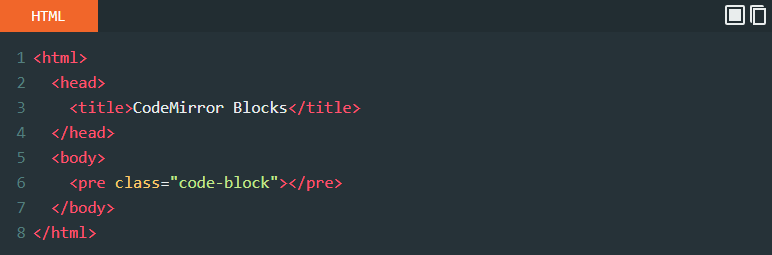
- Control Panel Added on top of the Code Block. ** It displays language/filename. ** It also display three buttons, includes Run/Execute, FullScreen, Copy Code
- Web editor (Execution of HTML, CSS JavaScript block) With CodeMirror Block 1.1
- Option Page for set default options
- Highlight Active Line (now available on CodeMirror Block 1.1)
- CodeMirror Block 1.1 now support Block align (Wide Width, Full Width) if your theme Supports
- Classic Editor Support (Partial)
- Lightweight and fast
- Secure code with using clear coding standards
- Intuitive interface with many settings
- Cross browser compatible (work smooth in any modern browser)
- Works also on android mobile browser
- Compatible with all Default WordPress themes (tested with Latest Twenty Twenty-Four)
CodeMirror Blocks reviews and ratings
41 reviews on WordPress.org, with the most recent ones as their authors posted them.
41 reviews
- 5★
-
41
- 4★
-
0
- 3★
-
0
- 2★
-
0
- 1★
-
0
-
Good plugin
A good block plugin.
davidjackson5 -
Good plugin
Good plugin, thanks for sharing. I have question I know you removed the run/execute button for HTML, CSS and JavaScript due to security issue XSS. but are you willing to add again after fixing it maybe?
Amr Abdelkarem -
Fantastic Plugin
Awesome code mirror blocks with syntax highlighting. Perfect for adding code snippets. Highly recommended!
linuxbeast -
Good plugin for code block
Good plugin for code block
pcskull -
Top great work!
Top great work!
minimamente -
Very usefull
This plugin is very usefull to have a blog about computing development.
bertrandroussel
Download and install history
502 downloads over the last 49 days. Snapshots taken daily from WordPress.org.
CodeMirror Blocks alternatives
Plugins that solve the same problem, ranked by how closely they overlap with CodeMirror Blocks.
-
 HTML Editor Syntax Highlighter 60,000+ installs · 4.4
 -
 Central Color Palette 10,000+ installs · 4.9
 -
 Block Navigation 3,000+ installs · 5.0
 -
 Advanced Rich Text Tools 3,000+ installs · 4.8
 -
 Qubely 7,000+ installs · 4.0
Details
CodeMirror Blocks is useful for tutorial site where display formatted (highlighted) code block. With support of 100+ Language/Mode and 56 Themes.
The full description, screenshots and every review live on the WordPress.org page.
Tags
- Codemirror
- editor
- gutenberg
- syntax highlighter
More from Vicky Agravat
-
 Program Output 10+ installs
- Version
- 2.0.3
- Last updated
- Apr 9, 2024
- First published
- Dec 20, 2018
- Requires WordPress
- 6.0
- Tested up to
- 6.5.13
- Requires PHP
- 7.0
- Pricing
- Free on WordPress.org
CodeMirror Blocks FAQ
What does CodeMirror Blocks do?
According to its WordPress.org readme, CodeMirror Blocks offers Control Panel Added on top of the Code Block. ** It displays language/filename. ** It also display three buttons, includes Run/Execute, FullScreen, Copy Code, Web editor (Execution of HTML, CSS JavaScript block) With CodeMirror Block 1.1, Option Page for set default options, Highlight Active Line (now available on CodeMirror Block 1.1) and CodeMirror Block 1.1 now support Block align (Wide Width, Full Width) if your theme Supports.
How many active installs does CodeMirror Blocks have?
WordPress.org reports 1,000+ active installs for CodeMirror Blocks as of October 23, 2026.
Is CodeMirror Blocks still maintained?
The last release was on April 9, 2024, more than a year ago. WordPress.org shows a warning on plugins that go this long without an update.
Is CodeMirror Blocks free?
CodeMirror Blocks is free to install from WordPress.org. Many plugins also sell a paid version or add-ons.